2026
On-Demand Support
One-click connection to a customer
On-demand remote support, unattended access, and cross-platform screen sharing for IT and customer support operations.
Zoho Assist is a cloud-based remote access tool that lets IT teams, MSPs, and customer support professionals deliver remote support. Open on-demand sessions with one click, or use unattended access to reach remote devices without a customer present.
Supports all major platforms — Windows, macOS, Linux, Chromebook, Raspberry Pi, iOS, and Android. Meets enterprise security standards with AES 256-bit encryption and two-factor authentication. Offers a clear price advantage over TeamViewer.
Cross-Platform
Windows, macOS, Linux, Chromebook, iOS, Android
Cloud-Based
No installation — start sessions from a browser
AES 256-bit
TLS 1.2/1.3 + two-factor authentication

One-click connection to a customer
Reach remote devices without customer presence
Customer creates request, technician responds
Multi-monitor support and selective views
Why Zoho Assist?
IT support teams are stuck with expensive licenses for remote access to corporate devices. Free alternatives bring security gaps and session limits. Solving customer issues without on-site technicians is hard.
Cloud-based, cross-platform remote support and unattended access. Enterprise encryption, two-factor authentication, session recordings, and audit logs. Service Queue lets customers initiate their own requests.
Issues that don't need on-site dispatch are resolved remotely in minutes
Clear price advantage over TeamViewer/AnyDesk
Enterprise security (AES 256-bit + 2FA) included on all plans
Zoho Assist Overall Rating
Cloud-based, cross-platform, and affordable remote support solution. A leader among TeamViewer alternatives.
A feature set that covers everything from IT helpdesk to MSP operations.
Send a 6-digit access code to the customer. They connect from a browser or a small agent — no installation required.
Expert Tip
When setting up unattended access, define device groups and technician roles carefully. Wrong access policies undermine enterprise security.

Cross-Platform Screen Sharing with Zoho Assist
Customers connect in seconds with a 6-digit code. Browser-based session that requires no installation.

Cross-Platform Screen Sharing with Zoho Assist
Group all your unattended devices on one panel. Assign technician access to groups, monitor status.

Cross-Platform Screen Sharing with Zoho Assist
See all monitors on the target device. Securely transfer files in both directions during the session.
—
Which teams and industries benefit most from this product? Explore the contexts where it creates the most value.
Centralized management and audit for IT teams supporting internal corporate devices.
Unattended access and technician roles for MSPs managing multiple customer environments.
Service Queue and session recordings for customer success teams supporting software or devices.
Native integration with Zoho Desk plus connections to popular IT/PSA platforms.
Start a remote support session directly from a helpdesk ticket.
ITSM integration with the enterprise IT management platform.
Initiate sessions from the Atlassian ITSM environment.
Trigger remote support links from messaging platforms.
Zoho Assist offers tiered plans from Free to Enterprise.
Small teams and individual use
Starting point
Contact us for pricing
Free for 1 technician and up to 5 unattended devices
Small IT teams
Starting point
Contact us for pricing
Per technician/month, billed annually
Mid-size IT and MSPs
Starting point
Contact us for pricing
Per technician/month, billed annually
Compare Zoho Assist with popular remote support tools on the market.
| Criteria | Zoho Assist | TeamViewer | AnyDesk |
|---|---|---|---|
| Price/Performance | ⭐⭐⭐⭐⭐ | ⭐⭐⭐ | ⭐⭐⭐⭐ |
| Cross-Platform | ⭐⭐⭐⭐⭐ | ⭐⭐⭐⭐⭐ | ⭐⭐⭐⭐ |
| Cloud Management | ⭐⭐⭐⭐⭐ | ⭐⭐⭐⭐ | ⭐⭐⭐⭐ |
| Session Performance | ⭐⭐⭐⭐ | ⭐⭐⭐⭐⭐ | ⭐⭐⭐⭐⭐ |
| Helpdesk Integration | ⭐⭐⭐⭐⭐ | ⭐⭐⭐⭐ | ⭐⭐⭐ |
Tangible advantages highlighted by IT teams and MSPs that choose Zoho Assist.
Significantly more affordable per technician compared to TeamViewer and AnyDesk.
No server setup. Start sessions from a browser, manage everything from a centralized panel.
Windows, macOS, Linux, Chromebook, Raspberry Pi, iOS, and Android — all in one interface.
AES 256-bit encryption, TLS 1.2/1.3, two-factor authentication, and session recordings on all plans.
One-click remote sessions from a helpdesk ticket. A critical advantage for customer success teams.
Related Services

Zoho Technical Support — Sustainable Operations After Go-Live
Monthly support packages for the Zoho ecosystem: troubleshooting, minor development, admin, and training. Sustainable Zoho operations with a maintenance contract.
Request a Maintenance Contract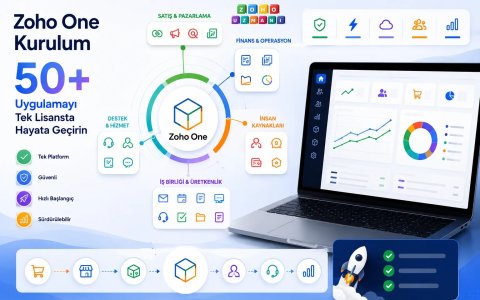
Zoho One Implementation — Roll Out 50+ Apps Under One License
We roll out the 50+ apps in Zoho One with a custom phased roadmap. License modeling, app selection, and staged onboarding included.
Get a Free License Analysis